QRhop
QRhopQR code safety checklist before you open a link
A QR code hides a long value; it does not certify the destination. Reading the result before acting is the most useful first defense.
Inspect a QR imageReview before opening
Turn off automatic opening and read the image. Inspect the complete result and domain, including look-alike spelling and unexpectedly long addresses.
Do more than check for https. Confirm through a separate official channel that the organization uses that domain. HTTPS encrypts a connection; it does not certify honest content.
Pause when a page asks for a login, transfer, app install or unusual permission. Confirm the same request in the official app or at an address you typed yourself.
Remember that a Wi-Fi QR may include a network name and password. Limit who can see it and avoid posting sensitive QR images publicly.
Identify the payload type
A QR may hold a URL, plain text, an email draft or Wi-Fi credentials. Do not force a non-URL value into a browser. Read what action the decoded content is asking the device to perform.
Check spelling and redirects
A deceptive code can use a one-letter domain change or several redirects. For a known service, cross-check the request through a bookmark, official app or a verified address you enter directly.
Payment and account codes
Look for a sticker covering the original code on a bill, sign or table. Confirm the amount and payee in the payment screen. Enter passwords and one-time codes in an official app rather than a page reached from an unexpected QR.
Browser processing and storage
Basic QRhop reading happens in browser memory, and an image is not stored as a project unless you choose a separate save feature. Device downloads, clipboard managers and browser extensions remain outside QRhop.
If you already opened a suspicious link
Close the page and do not open downloaded files. If you entered a password, change it through the official service and review multi-factor authentication and login history. Contact the payment provider through its official support channel after a financial transaction.
QR safety questions
Does HTTPS make a QR destination safe?
No. HTTPS protects the connection but does not guarantee trustworthy content or ownership.
Does QRhop upload my image?
Basic single-image reading runs in browser memory. A separate save feature applies only when the user chooses it and sees its consent notice.
Should I use automatic opening?
It is convenient for trusted codes. For an unfamiliar source, turn it off and inspect the result first.
Same QR, different images: compare them yourself
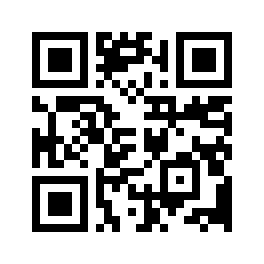
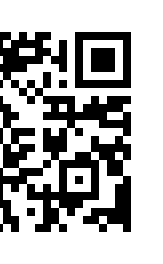
Download the original, a one-pixel-per-module reduction and a copy with the left corners removed. Results below come from decoding the raw pixels with jsQR 1.4.0, the decoder used by QRhop. Load each file into the free reader and compare the content and address.
Download sample

Download sample
Download sample
Download sample
| File | Image dimensions | Module size | Image decoding result |
|---|---|---|---|
| Original link QR | 264 × 264px | 8px | Matches the input |
| 33px reduced link QR | 33 × 33px | 1px | Matches the input |
| QR with left corners removed | 163 × 264px | — | No decoded result |
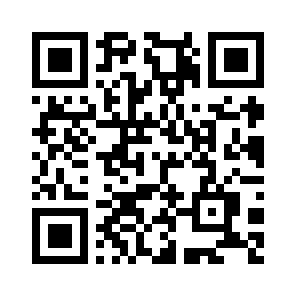
| Plain text QR | 296 × 296px | 8px | Matches the input |
Switch automatic opening off and load the original. Its content should be https://qrhop.makeup/. Reading the QR and visiting the site are separate actions.
Compare the reduced and cropped files. A decoded 33px image is not evidence that its print or every phone camera will work. Recover a cropped code by obtaining the original.
The text sample decodes to a sentence, not a web address. The absence of an Open website button does not mean decoding failed.
How to interpret this record
A small image may decode when its pixels are intact. A larger image can fail when its finder patterns are removed. These are four sample checks, not a success-rate study, recommended scan-distance measurement or device compatibility survey.
Verification record JSON · Download sample → QRhop